Saturday, March 3, 2012

Achievement Compact Powerpoint

http://www.slideshare.net/sandersc100/achievement-compact-pp-11844305

In order to embed a powerpoint presentation into your blog you must register with SlideShare and upload your presentation. This allows the world to see your presentation and it will also track how many people are viewing your powerpoint and how many are downloading it. There are upgrades for a yearly fee. I noticed the presenters at the Oregon Technology Integration Conference all used SlideShare when sharing their many presentations.

Friday, March 2, 2012

The New Me....VOKI

I think using a voki as your on line personna is a great idea especially for students. The avatar protects their real identify. Learn more about using voki.com on this YouTube video. 
http://www.youtube.com/embed/Y9gHpIH9RTA

Once done, click on my voki page to see and hear the new me~
http://www.voki.com/mywebsite.php

On voki you can search for content specific lesson plans to engage your students. 

The TASC standards met are 2c be 4g 3g
The OEST standards that this could help meet are 1a 1b 1c and 2a 2b 2d


Saturday, February 25, 2012

Great Resources

Silvia Rosenthal Tolisano-German born; Global Citizen
globallyconnectedlearning.com
Blog:www.langwitches.org/blog
Twitter: langwitches
Skype: langwitches
http://langwitches.wikispaces.com/


Rushton Hurley
Next Vista for Learning at NextVista.org
The online Library of Video Resources by and for Teachers and Learners
www.nextvista.org
rh@nextvista.org

Mrs. Yollis-Classroom Teachers
http://yollisclassblog.blogspot.com/

Web Tools for Kids
http://weewebwonders.pbworks.com/

Digital Bloom's

http://youtu.be/tL7enV-gCr0?hd=1

I am learning how to embed a YouTube video into my blog! This video is about 2 minutes long discussing Benjamin Bloom's critical thinking skills placed in a triangle with aligned digital tools and programs. Check it out!

Newly Revised Bloom's Poster for Elementary Teachers

http://blog.learningtoday.com/blog/bid/22740/Bloom-s-Taxonomy-Poster-for-Elementary-Teachers

Download The Blooming Butterfly poster as a pdf.


The Blooming Butterfly poster was designed by the Learning Today product development team as a tribute to Bloom and Anderson and to the educators all over the world that continue to implement their vision. We hope that it will serve as a visual reminder for teachers as they continue to guide students to become better thinkers, just as Bloom imagined many years ago!


Here's another poster to help get you thinking about how you can apply Bloom's higher-order thinking skills in your classroom. This poster shows the segments of an orange with each segment relating to a thinking skill and some helpful verbs to serve as prompts.
http://blog.learningtoday.com/blog/bid/23376/Blooming-Orange-Bloom-s-Taxonomy-Helpful-Verbs-Poster


Download the pdf's here:

Friday, February 24, 2012

iMovie Presenting Content and Content Blog


Start a new video project

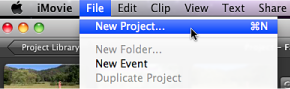
  1. In iMovie, choose File > New Project.
    The File menu appears in a light gray bar across the top of your computer screen.
    Image of File menu with New Project selected.

    iMovie is a great presentation tool. Looking at the matrix, this tool is easy to access. Personal voice overs and embedded videos using iMovie would help students access content. This tool is for MAC users and the company has a great track record! Reliability is solid.
    OEST STANDARDS:1b,2a,2b
    TASC-Professional Learning


Make Propoganda


http://www.makepropaganda.com

This is a Windows platform only. The tutorial I watched on line presents this program as an easy tool to create your own podcast.

iPads APPS for Revised Bloom's Taxonomy

Look here!

Tuesday, February 21, 2012

Assignment 3A Google Groups Communication Blog

What is it?
Google Groups is a free, online service that helps groups of people easily share information and communicate effectively. Groups are public or private places where members share files, post ideas, and conduct discussions either on the web or via email. All emails sent to the group are archived for future reference and are easily searchable, either privately or publicly.
Why use it?
Students can use Google Groups to:
Extend class discussions online.
 Share ideas, store documents, and organize web
resources as they work on a team project.
Create a private group for school clubs or sports teams
to share the latest news, announcements, and pictures.

Teachers can use Google Groups to:
Make class handouts, reading materials, assignments, and web links available to students and their parents. (A Google Group could even be used to manage an online class!)
Send email announcements to parents.
Centralize resources and communication for grade levels,
departments, or professional learning communities.

Instructional Ideas
Elementary. Set up a parent-child book club using Google Groups. Students and parents read the book together at home and then respond to the discussion questions you post to the group.
Middle School. Create an online study group. Each day assign one student to post class notes as a new page in the Group. Then ask students to respond to reflection questions in the discussion area. Use the “Rate this Post” feature for participation grades or peer review.
High School. As part of a career-exploration project, have students join a publicly available Group related to their field of interest. After reading through the discussion archives, have each student post appropriate career questions to the groups.


OEST STANDARDS: 1(b), 2(a,b,d), 3 (a,b,c,d), 4(b), 5(b)
om other members.


Monday, February 20, 2012

I Won a Kindle Fire

I never win anything, but today my luck changed.... I won a Kindle Fire in an electronic raffle! I am attending the Instructional Technology Strategies Conference held at the Sheraton Airport Hotel Sunday-Tuesday and each time you visited a vendor they signed you in on their iPads and it sent an electronic raffle ticket to some database in the clouds. At lunch they clicked a button that said "choose a winner" and my name came up!


 My head is spinning with so many resources that supports technology integration in the classroom. Can't wait to share with my new classmates. 


Sunday, February 19, 2012

Blogs, Wikis, Podcasts Communication Tool #3

Wikis

Click the link called wikis. It will take you to our district web page. Click on the link in the top red bar called Staff and then click on the link for Wiki Collaboration. I will be showing how we are using wikis within our Leadership Team and within our schools. Wikis are like a public bulletin board. We use it to post resources, current data and live links to all sorts of things. Staff can leave comments. I am experimenting with a School Improvement wiki page so staff can return over and over again and find information. 
OEST STANDARDS: 1(b), 2(a,b,d), 3 (a,b,c,d), 4(b), 5(b)

 I found an interesting book on Amazon from Heinemann, which is one of my favorite curriculum resources.


Professional Development Using Google Docs

February 17 was a big staff development day! Over 200 teachers used Google docs  (groups.google.com) to individually enter work sample scores in math, shared their results with their table group members and discussed and reviewed their groups inter-rater reliability when looking at the scores. A wonderful way to calibrate across the district! We spent a morning learning the new math problem solving rubric, Common Core State Standards mathematical practices and analyzed student work. Teachers were immersed in math in the morning and writing in the afternoon. A great day of learning and collaborating!


Google docs is a great way to have staff complete an evaluation of the workshop too. Right on the spot teachers can give their input regarding their key learnings, feedback on what went well and gather suggestions for improvement while fresh in everyone's mind. The results are instantly tabulated and can be reviewed immediately.


Saturday, February 11, 2012

Engagement and Partner Work

http://www.youtube.com/watch?v=AMDvD_Ewf0U&feature=youtube_gdata_player

Doodle


Doodle is a great way to get confirmations from people for when they are available for an event. You can send a poll or an invite, so it is a great pre-planner/organizer. Once everyone has confirmed the date and time a meeting invitation can be sent. Very effective and very efficient. I'm going to experiment more with doodle before sending out an email asking for information or a meeting invitation with just one time offered for the meeting and have everyone either confirm or decline.


I want to become more proficient with Google.docs. Right now I tend to think of Google.docs after I've created something, instead of thinking of it first.

Friday, February 3, 2012

Tools Continued


With more cuts to our district and more responsibilities being added to everyone's plate, my Administrative Assistant and I find we need to meet daily to identify our priorities as they seem to be ever changing by the hour. Using the meeting/appointment/calendar feature in Outlook is a great tool for setting up meeting times. This feature saves time, phone calls, emails and is very effective for setting a common meeting time for a group of people. I do need to slow down...and make sure I select AM instead of PM for meetings I schedule. :) Luckily, one person caught my mistake and wanted to verify! She said she had to verify as she wouldn't put it past me to work everyone well into the night. Not sure that is a compliment. The Technology Standard that best fits the tools I've been focusing on this week would fall into the category of Modeling Digital-Age Work and Learning and also Engage in Professional Growth and Leadership. (Google docs, wikis and Outlook Calendar)

Saturday, January 28, 2012

Choosing Tools/Matrix

Matrix for Choosing Tools
My very nature is to be systematic in my approach to life's decisions, planning events and building programs, so the decision making matrix for matching technology tools to your instructional design makes total sense. In order for technology to be effective in teaching and learning there must be a good fit between the operations or technical requirements of the program and the instructional goals and objectives. Accessibility and reliability are key as well. How many times have I heard, "Technology is great, when it works, but the source of much frustration when it doesn't!" There is nothing worse than to count on a program in your lesson that supports teaching and learning and then it doesn't work for what ever reason. All your students waiting, some not very patiently as you stare at your laptop and pray it magically starts to work. One or two times with this happening within the classroom and teachers will shy away from incorporating technology into their classrooms. I don't blame them. Time, time, time....time to plan, time to learn the technology, time to try it out, time to help students master the technology, time to share....all needed when matching technology to our instructional design. Teachers need more time! Administrators too!

Reflection


I believe that the read/write Web, or what we are calling Web 2.0, will culturally, socially, intellectually, and politically have a greater impact than the advent of the printing press. (2008) Steve Hargadon believes we cannot even begin to imagine the changes that are going to take place as the two way nature of the Internet begins to grow. He identifies ten trends that have particular importance for education and learning. He then discusses seven steps he thinks educators should take to make a difference during this digital revolution. Read his entire speech by clicking here.  link  


I believe one of the most impressive things about Web 2.0 is the fact that it is not under the control of any one person, organization, or institution. In essence, everyone owns the technology, everyone can contribute and everyone can learn something. For a number of reasons, I believe the Web 2.0 and the eventual future Web 3.0 is the perfect environment for educators. These tools are going to dramatically shape how students learn, how educators approach teaching and how we will learn from each other.
I also believe the Web 2.0 tools play to the strengths of educators--curiosity, collaboration and love of learning. It is an incredibly exciting time as well as confusing and even an intimidating time to a large number of us as we embrace the new social dynamics of technology within the realm of education. Bottom line, I feel very much behind in my knowledge and skills with technology and have an anxiety about catching up!


Learning Curve

Post 2
Coming to the end of my first class and I've learned to create a blog and post to a blog! Major accomplishments...hope I can remember everything I've learned so I can do my homework successfully.

The Technology Toolbelt for Teaching

Welcome to my journey of new learning regarding Technology Connections for Effective Teaching!